
Quick Answer
MCP is an open standard that lets AI applications plug into outside tools, data and services through one common interface. Build an MCP server once for a system, and any compatible AI agent can find it and use it. No more rewriting a custom integration for every new assistant.
Key Takeaways
- One standard replaces a pile of one-off AI integrations.
- MCP sits alongside your APIs, not in place of them.
- The protocol is the easy bit. Ownership and permissions are where enterprises slip.
What Is MCP (Model Context Protocol) and Why Does It Exist?
MCP is an open standard for connecting AI applications to the tools and data they need. Anthropic released it in November 2024, and it now sits under the Linux Foundation, so no single vendor controls it.
Before MCP, every assistant needed its own connector to every system. Five assistants and ten systems could mean fifty custom integrations, each with its own security review and maintenance bill. MCP flips that. Build one server per system, and every MCP-compatible client can use it. Think USB-C for AI: one port, many devices.
The industry noticed. In December 2025, Anthropic donated MCP to the Agentic AI Foundation, co-founded with Block and OpenAI and backed by Google, Microsoft and AWS. It reported more than 10,000 active servers and 97 million monthly SDK downloads by then. Not a side project.
Quick glossary:
- Host: the AI app your people actually use.
- Client: the connector the host runs for each server.
- Server: the program that exposes a system’s capabilities.
- Tool, resource, prompt: an action, a piece of data, a reusable template.
How Do MCP Servers Work?
An MCP server is a small program that exposes a system’s capabilities to AI applications in a standard format. The AI app connects, asks what’s on offer, and calls those capabilities when a task needs them.
- The host starts one client for each server it uses.
- The client asks the server which tools, resources and prompts it offers.
- The model picks a tool for the task, and the host sends the request.
- The server does the work in the underlying system and returns the result.
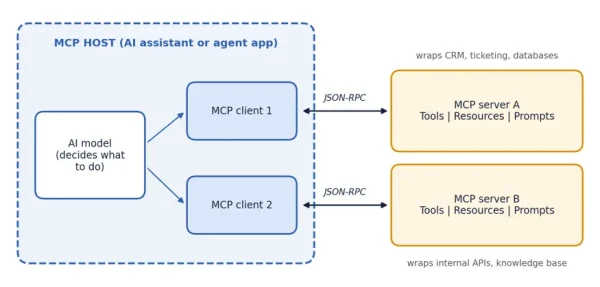
Figure 1: How an MCP host, its clients and MCP servers connect. (Alt text: What is MCP Model Context Protocol: diagram of an MCP host with an AI model and two clients connected to two MCP servers)
Servers expose three things: tools (actions like “create a ticket”), resources (data such as a policy document) and prompts (reusable templates). Messages travel as JSON-RPC. According to the MCP specification, each client talks to exactly one server, and the host enforces security boundaries. Read that last part twice. The model proposes; the host decides what’s allowed.
MCP explained for enterprise leaders, in one line: one server per system, one standard way to ask, one place to apply controls.
MCP vs API for AI Agents: What’s the Difference?
An API is how software talks to one specific system. MCP is a shared layer that lets an AI agent discover and use many systems the same way. Most MCP servers sit on top of existing APIs, so the real answer is usually both.
| Traditional API | MCP | |
| Built for | Developers writing fixed code | AI agents choosing actions at runtime |
| Discovery | Read the docs, hardcode the call | Agent asks the server what it offers |
| Integration effort | Custom per app and system | One server, reused by any MCP client |
| Consistency | Varies by vendor | Same pattern across servers |
| Typical owner | Application team | Platform team or system owner |
APIs still win for high-volume, predictable jobs like nightly data syncs. No agent needed there. MCP earns its place when an agent has to choose between tools mid-task, such as checking an order, opening a ticket, then drafting the customer reply.
Cognixia’s Source-Build-Embed View of MCP Readiness
We use Source-Build-Embed to judge readiness for any AI capability, and MCP fits it neatly. Source is picking the system worth connecting. Build is shipping a working server. Embed is keeping it governed and in use after launch. Our view: most teams are strong on Build and thin on the other two.
A quick self-check:
- Source: Can you name one workflow where an agent needs this system, and explain why read-only access is enough to start?
- Build: Could your team ship a tested server in a couple of weeks, with clear tool names and sensible error handling?
- Embed: Does it have a named owner, user-level permissions and a log of every tool call?
Be strict. A server that runs on one laptop isn’t shipped, and a shared service account with access to everything isn’t governed. Two honest “no” answers? Good, now you know what to fix. Treat third-party servers like any software dependency: review the source, pin versions and test on non-production data first. Our Source-Build-Embed page explains how we train for all three.
What Skills Do Teams Need for MCP Adoption?
Three layers: leaders who can judge value and risk, engineers who can build and secure servers, and operations teams who can supervise agents once they’re live.
- Leaders: pick use cases, set risk appetite, evaluate vendors. Our guide to agentic AI training for business covers the wider roadmap.
- Engineers and platform teams: build servers, handle authentication, test tool behaviour. Cognixia’s Applied AI and Platform AI training areas cover this ground.
- Security and operations: manage permissions, monitoring and incident response.
Model Context Protocol training sticks best when it’s tied to a real system. Have the team build a read-only server over an internal knowledge base, run the self-check above, then expand. Forward Deployed Engineers often do this work, sitting with business teams to wire AI into live workflows. We explain the role in our guide to forward deployed engineers.
Frequently Asked Questions
Load More
Conclusion: Your Next Move
- Learn the three moving parts, host, client and server, and keep MCP beside your APIs.
- Run the Source-Build-Embed check before any server goes live.
- Choose training tied to a real system your team owns.
So, what is MCP (Model Context Protocol) in practice? A standard that takes an afternoon to understand and real practice to run safely. Start with the self-check above, then talk to Cognixia about MCP training for enterprises through Enterprise AI Enablement.
Interested in MCP Training for Enterprises?
We'll shape a path around your stack and roles.
Talk to Cognixia